Local-first · exam-ready · installable

One calm command center for every exam you prepare for.

Harbor Home brings your syllabus, mock scores, mistakes, timers, resources and tasks into one quiet dashboard — starting ready-made for JEE, NEET, UPSC, CLAT, CAT, GATE, SSC, state CETs and boards.

Works without an account Stays on your device Optional Google Backup
JEE Prep 68% ready

Syllabus

Physics72%
Chemistry48%
Maths35%
! 2 mistakes due for review

Focus

25:00POMODORO
78%Latest mock
12dStreak
Built for the exams Indian students actually prepare for
JEE🧬 NEET🏛 UPSC CLAT📊 CAT GATE🛡 NDA📜 SSC CGL🎓 CUET📘 Boards MHT CET KCET WBJEE COMEDK AP / TS EAPCET KEAM GUJCET OJEE
The real thing

Not mockups. The actual app.

Every shot below is Harbor Home running on desktop — no renders, no mockups. This is what you get when you open it.

harborhome.app
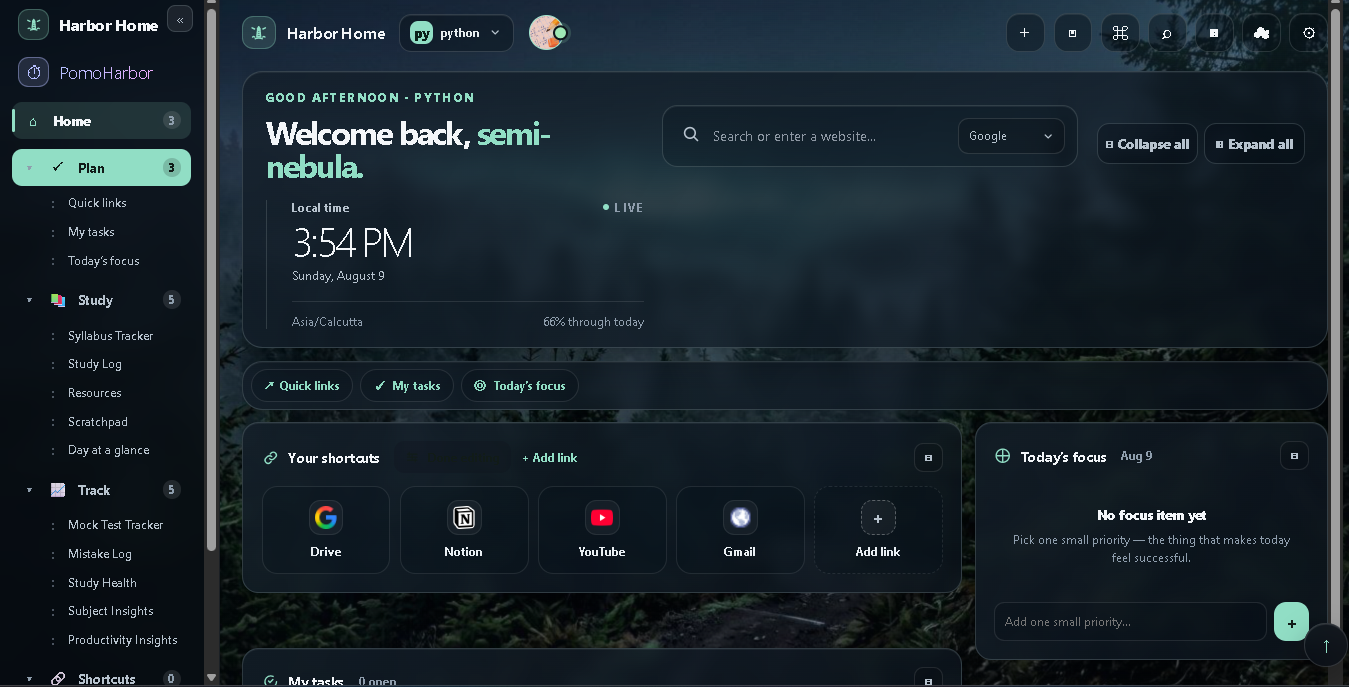
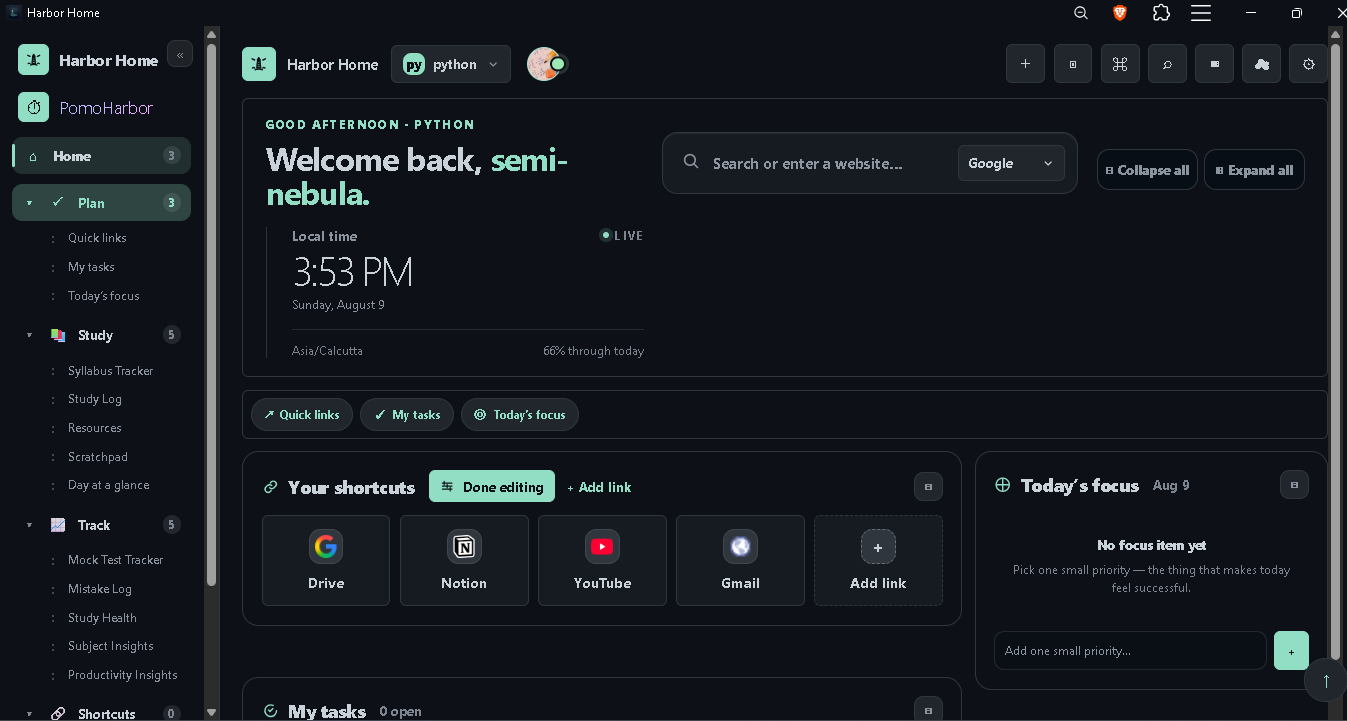
Harbor Home dashboard — the study command center
The study command centerSyllabus, mocks, mistakes, and readiness — all in one calm view, ready for your exam.
harborhome.app
Harbor Home in dark millennial theme
Themes that match your focusLight, dark, or a clean millennial theme — switch instantly, nothing lost.
harborhome.app
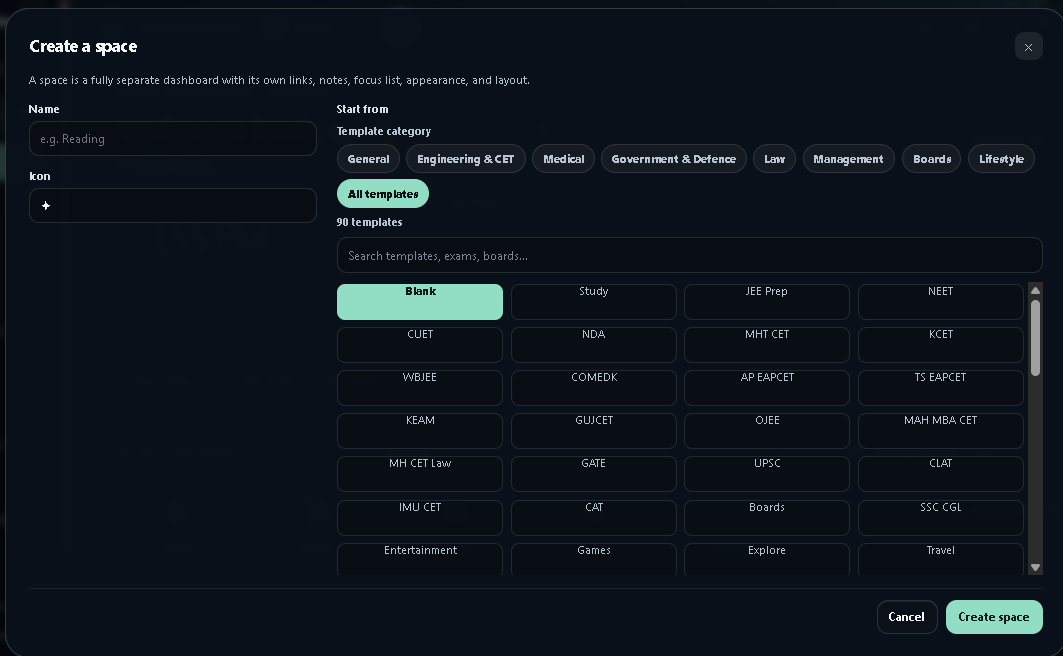
Create a space from an exam template
Ready in secondsPick a template and get a fully-built dashboard with rooms, widgets, and syllabus.
harborhome.app
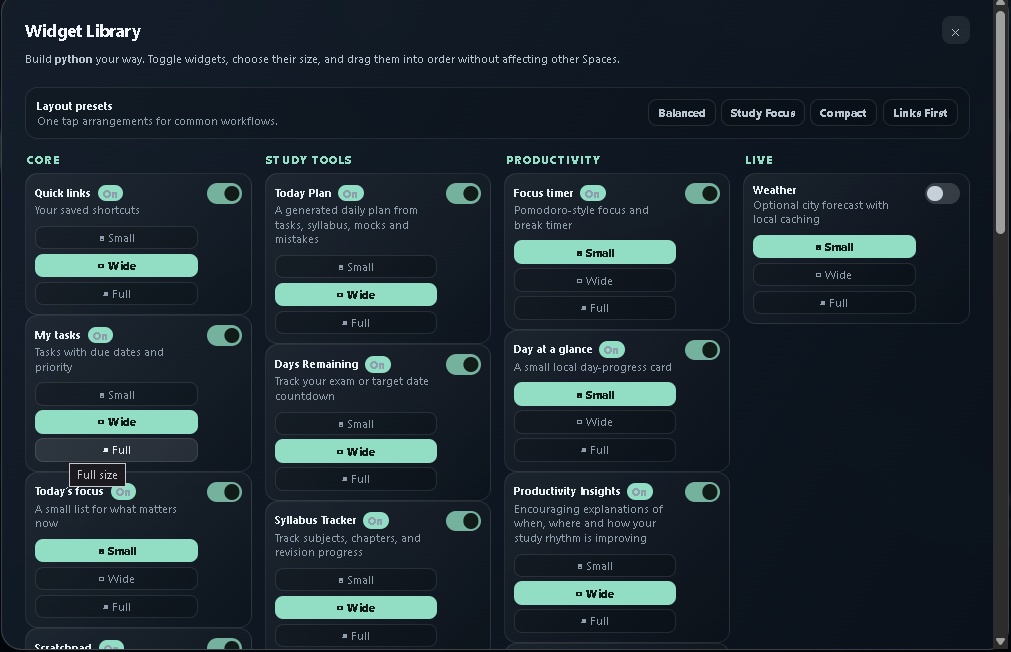
Widget library and room manager
Arrange it your wayToggle widgets, rename rooms, and drag everything where it belongs.
harborhome.app
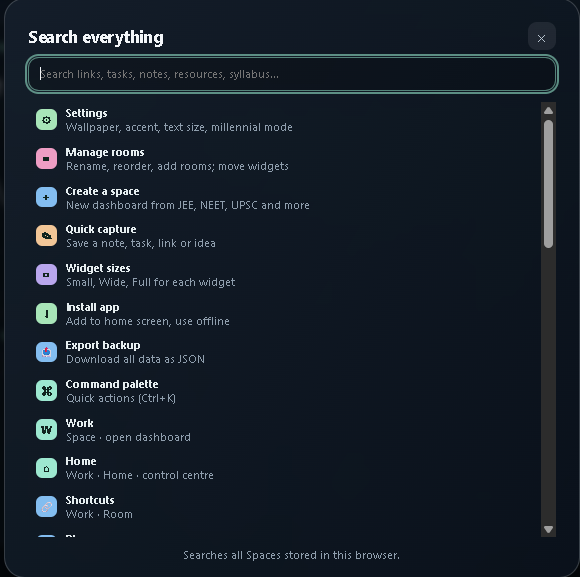
Universal search across the dashboard
Find anything, instantlyOne search across timers, tasks, settings, and resources.
harborhome.app
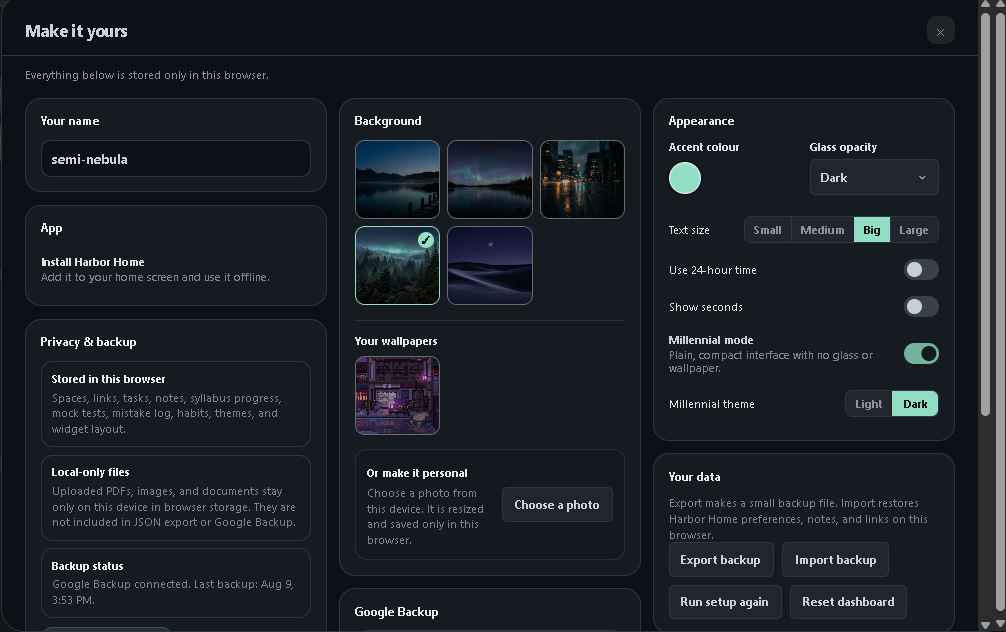
Settings and appearance panel
Quietly powerfulAppearance, text size, glass, wallpapers, and optional Google Backup.
harborhome.app
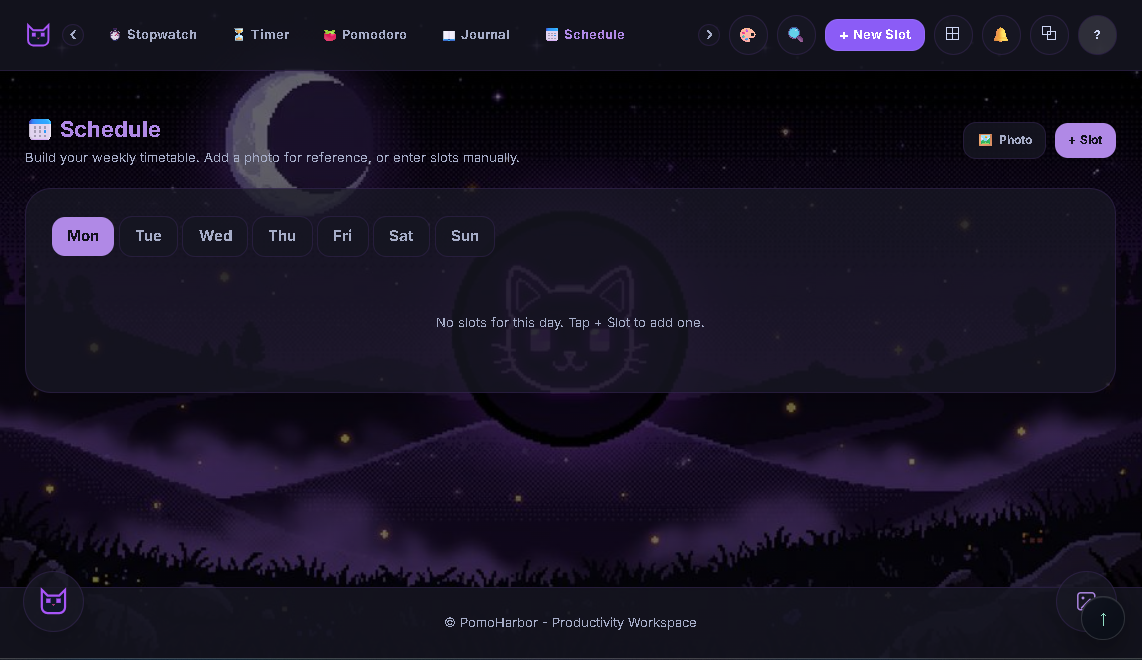
PomoHarbor focus room — timers, pomodoro, and schedule
A focus room, built inPomoHarbor brings timers, Pomodoro, schedule, and journal — no separate app.
harborhome.app
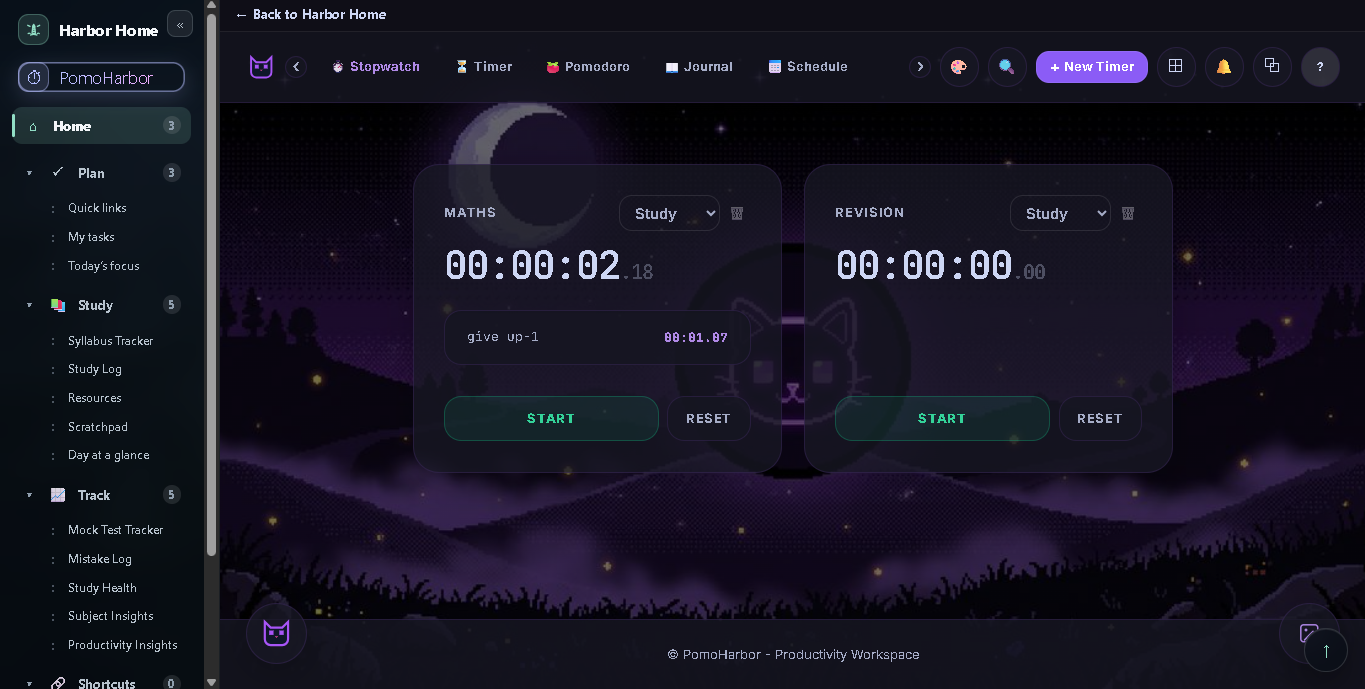
PomoHarbor multi-timer grid
Run multiple timers at onceUp to seven stopwatches and timers side by side, with laps and presets.
How it works

Less scattered tabs. More actual prep.

Pick an exam and Harbor Home sets up a ready dashboard with the right syllabus, official resources, tasks and tools — then quietly tracks everything that matters.

Syllabus that actually shows where you are.

Subjects, chapters and status cycles (not started → learning → revision → done) with live progress bars. Drag to reorder, search to jump.

  • Per-subject and overall completion
  • Marks what needs revision vs what's done
Physics · 14 / 20 chapters
Electrostatics
Current Elec.
Optics
Modern Phy.

Mock scores that tell a story.

Log every mock or sample paper and watch your average, best, latest and trend move over time — so you know if you're actually improving.

  • Score, total, percentile-style %
  • Trend arrows across attempts
Mock trend
54%Mock 1
67%Mock 2
78%Mock 3

Turn every wrong answer into a review.

The mistake log remembers what went wrong, the correction, and when to revise it — with spaced-repetition review dates so old errors don't quietly come back.

  • Type, correction & screenshot
  • Auto review schedule (1, 3, 7, 14, 30 days)
Mistake log
Rotational motion — torque signPhysics · Concept
Due today
SN2 vs SN1 reactivity orderChemistry · Memory
Review in 7d
Definite integral substitutionMaths · Calculation
Mastered

Timers & Pomodoro, built right in.

PomoHarbor is embedded as a dedicated focus room — multiple stopwatches, timers, a Pomodoro cycle, a weekly schedule and a study journal. No separate app, no tab-switching.

  • Up to 7 timers running at once
  • Pomodoro cycles + activity journal
Focus room
17:42
Pomodoro · Focus Session 2 of 4
⏱ Stopwatch⏳ Timer🍅 Pomodoro

A readiness score that updates as you study.

Harbor Home blends your syllabus progress, mock trend, consistency, revision and mistakes into one gentle "% ready" number — and tells you the next thing to focus on.

  • One calm readiness %
  • Names your weakest area + next step
Preparation health
68%
Good base — Chemistry needs focus.
72%Physics
48%Chemistry
61%Consistency
78%Mocks
The full toolbox

One dashboard. Every tool you need.

Turn on what you use, hide what you don't, and arrange everything into rooms. It all comes in the box — plus PomoHarbor, a full timers & pomodoro room built in.

Study tools
Syllabus TrackerSubjects, chapters, revision
Mock Test TrackerScores, trends, weak areas
!
Mistake LogErrors, corrections, review dates
Study LogSessions + 7-day trend
Study HealthReadiness % & predictions
Subject InsightsPer-subject dashboards
Productivity InsightsYour study rhythm, explained
Today PlanA generated daily plan
ResourcesDrive links + local files
Days RemainingExam countdown
Plan & focus
My TasksDue dates + priority
Today's FocusOne small priority
HabitsDaily habit tracker
Focus TimerPomodoro + breaks
CalendarMonth view + task dates
Day at a GlanceLocal day progress
ScratchpadNotes in this Space
Core & live
🔗
Quick LinksYour saved shortcuts
BookmarksBookmark bar + import
WeatherOptional city forecast
Private by default

Your prep belongs to you.

Harbor Home runs in your browser. Use it without an account, with everything stored locally. Google Backup is optional — and your uploaded files never leave the device.

🔒
No account neededThe whole dashboard works signed out, in your browser's local storage.
Backup is optionalSign in with Google only if you want a cloud copy. Restore keeps your local backgrounds & files.
📂
Files stay localPDFs, images and notes you upload never get uploaded to any server.
About

Built by one person, for everyone.

semi-nebula
semi-nebula Independent maker

Why this started

Student life is scattered — bookmarks, notes, PDFs, Drive folders, mocks, formulas, and a dozen random tabs. I wanted one calm place to start the day, track what matters, and keep my brain clear. What began as a personal homepage grew into an exam-prep command center — and it's still growing.

Who it's for

Anyone who wants a calmer, more organized digital space. Harbor Home is built with students in mind — especially those preparing for competitive exams — but professionals, creators, and anyone who wants a private, local-first dashboard can make it their own.

Questions, feedback, or found a bug? Email me — I read everything.
Pomoharbor.work@gmail.com
Get started

Three steps to your command center.

No setup, no account — just open and go.

1

Pick your exam

Choose from JEE, NEET, UPSC, CLAT, CAT, boards and 20+ more — and get a ready-made dashboard with syllabus, resources, and tools in seconds.

2

Track what matters

Log study sessions, mock scores, and mistakes. Watch your readiness score grow as your syllabus progresses and revision stays on schedule.

3

Stay focused

Use built-in timers, Pomodoro, and a daily plan to keep going — then back up to Google when you're ready, so nothing is ever lost.

Start your prep command center today.

Free, local-first and ready for your exam in about a minute. Open it, pick your exam, and begin.